WiFi Presence Detection for Home Assistant Using OpenWrt
My home has six OpenWrt access points spread across three floors. They already know exactly which phone is connected to which AP at every moment. This information is right there in the hostapd logs, screaming to be used. Yet Home Assistant’s default presence detection relies on GPS (slow, battery-hungry) or Bluetooth beacons (another piece of hardware to buy and maintain for each room). Neither felt right.
So I wrote openwrt-ha-presence: a state machine that parses AP-STA-CONNECTED / AP-STA-DISCONNECTED events from hostapd, builds per-person home/away state with room-level tracking, and publishes it to Home Assistant via MQTT Discovery. No cloud, no beacons, no polling. Python, async, ~900 lines of actual logic.
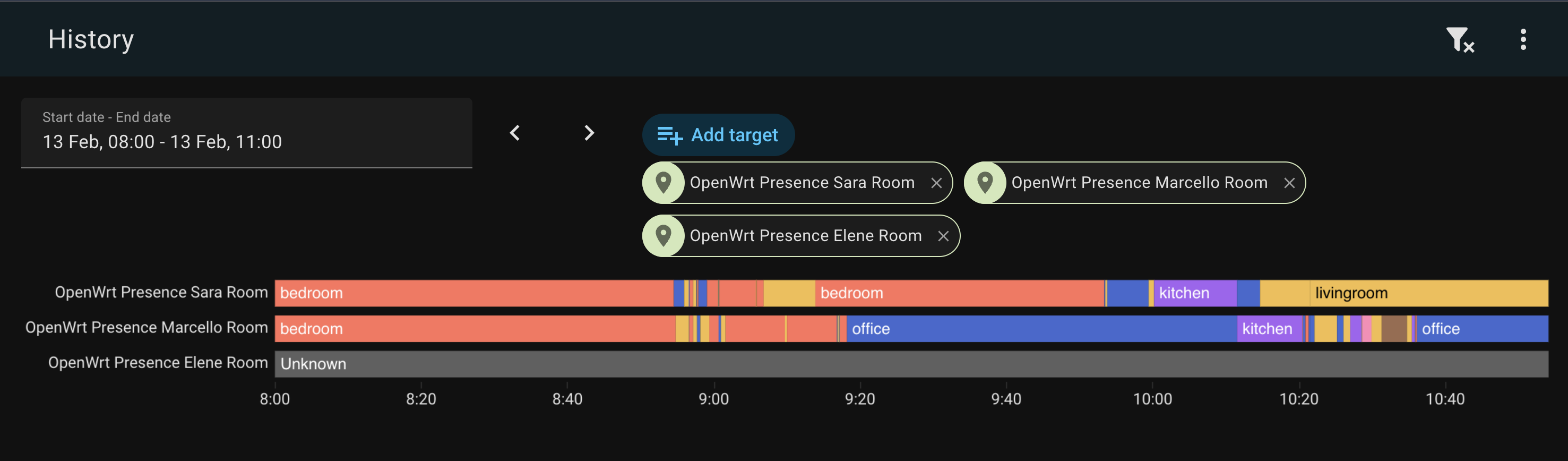
The Problem with WiFi Presence
WiFi presence sounds trivial until you actually try it. Your phone disconnects from WiFi constantly — AP roaming, screen-off power saving, the 37 daily reconnections your iPhone does for absolutely no reason. If you naively map “disconnect = left the house,” you’ll be marked as away every time you walk to the kitchen.
The key insight is that not all APs are equal. Disconnecting from your garden AP means something very different than disconnecting from your bedroom AP.
Exit vs Interior Nodes
This is the core of the design:
- Interior nodes (office, bedroom, kitchen, livingroom): disconnects are straight up ignored. Only connects update your current room. Your phone dozed off? Don’t care. Roamed to another AP? Great, that’s a room change.
- Exit nodes (garden): disconnect starts a departure timer. If you don’t reconnect to any AP within the timeout window (mine is 120 seconds), you’ve left the house.
This simple split eliminates 99% of the noise from WiFi events.
The Architecture
OpenWrt APs → VictoriaLogs → openwrt-presence → MQTT → Home Assistant
  (hostapd)    (log store)    (state machine)   (discovery)  (device_tracker + sensor)
Each person in the config has one or more MAC addresses (I have both a personal and a work phone). The engine tracks per-device state — CONNECTED, DEPARTING, or AWAY — and aggregates it into per-person state. If any of your devices is connected, you’re home. The room is whichever AP saw your most recent connect.
For each person, HA gets:
device_tracker.<person>_wifi—home/not_homesensor.<person>_room—office,bedroom,kitchen, etc.
Auto-discovered via MQTT. Zero manual HA config.
The Fun Part: Debugging
Building the state machine was the easy part. The fun began in production.
Clock skew: a love story
Four out of six APs didn’t have NTP enabled. The garden AP — the exit node, the one whose timestamps actually matter for departure detection — was running 3.5 minutes behind. This meant the 2-minute departure timeout was effectively negative. People who had clearly left were never marked as away because the timestamps said they hadn’t been gone long enough. Ask me how I found this.
I now have a section in the README that says “All APs must have NTP enabled and their timezone set to UTC.” It’s obvious. It wasn’t obvious.
Backfill ordering
On startup, the engine backfills the last 4 hours from VictoriaLogs to rebuild state. Problem: VictoriaLogs returns results grouped by log stream (per-AP), not in global chronological order. So if the last stream returned happens to be from the office AP, you end up in the office — even if the most recent event was from the livingroom. Fix: sort all backfill events by timestamp before processing. Simple, once you stop trusting the API to do it for you.
Sara’s phone: 3,821 events in 10 days
This was the best one. My partner Sara has an iPhone 16 Pro. I have an iPhone 16 Pro Max. Same house, same APs, same network. Yet her phone was generating 3.4x more WiFi events than mine. 78% of all her events were flapping — rapid connect/disconnect cycles on the same AP.
The diagnosis: two APs (office on the first floor, livingroom on the ground floor) stacked vertically with both running at 23 dBm — maximum transmit power. Through a 2.7m Italian concrete ceiling, Sara’s phone was seeing nearly identical signal strength from both APs and thrashing between them every 1-3 seconds. Her worst oscillation streak: 161 connects, bouncing back and forth like a ping-pong ball.
802.11r Fast Transition was making it worse — sub-second roaming meant the phone could thrash faster than it could with full re-authentication.
Fix: dropped TX power from 23 to 14 dBm on interior APs, and configured usteer’s min_connect_snr and min_snr thresholds to prevent weak associations. The phone can’t thrash between APs if the AP refuses to talk to it.
Graceful Shutdown
The event loop tails VictoriaLogs via a long-lived HTTP streaming connection. When you hit Ctrl+C, async for event in stream blocks forever waiting for the next chunk. The fix was racing __anext__() against a stop event using asyncio.wait(FIRST_COMPLETED), with a sentinel pattern because StopAsyncIteration can’t propagate out of an asyncio Task (it becomes a RuntimeError). Standard asyncio fun.
The Monitor
For debugging, I wanted a real-time pretty-print CLI. docker container logs eve -f gives you raw JSON, which is… not fun. So there’s a built-in monitor that reads JSON from stdin and renders it with ANSI colors:
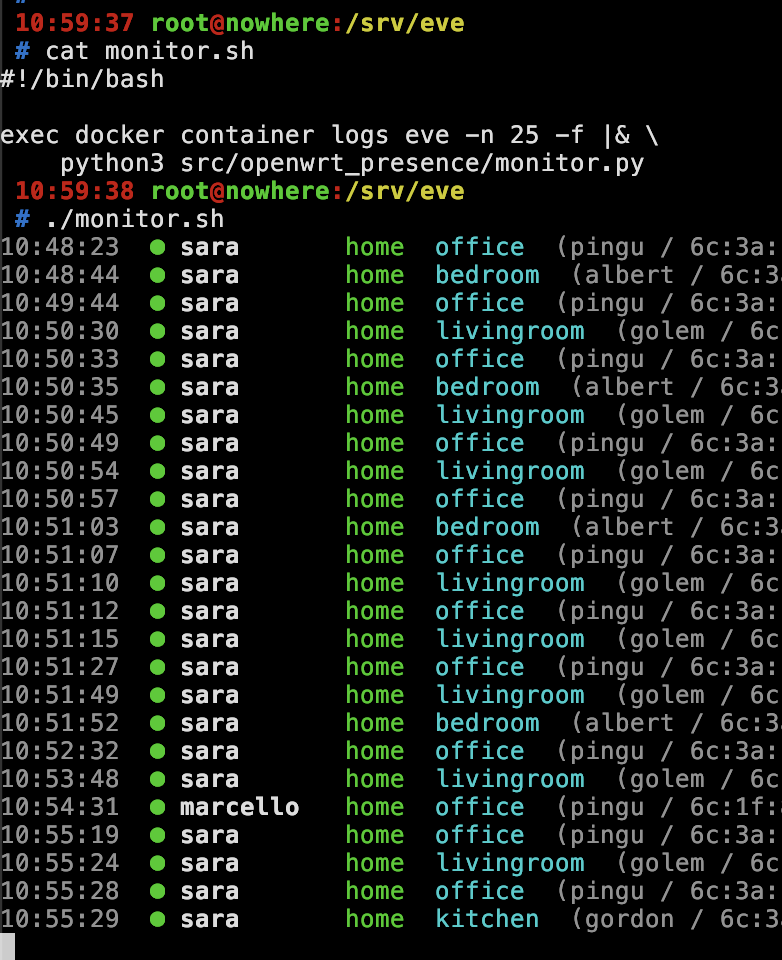
Green bullet for arrivals, red for departures, room names in cyan. Pure stdlib, no dependencies, runs directly with python3. You can see Sara’s phone thrashing between office and livingroom in that screenshot — every few seconds. That’s before the TX power fix.
Alarm Automation
The original itch I was scratching: arm the alarm when everyone leaves.
automation:
  - alias: "Arm alarm when everyone leaves"
    trigger:
      - platform: state
        entity_id:
          - device_tracker.alice_wifi
          - device_tracker.bob_wifi
        to: "not_home"
    condition:
      - condition: state
        entity_id: device_tracker.alice_wifi
        state: "not_home"
      - condition: state
        entity_id: device_tracker.bob_wifi
        state: "not_home"
    action:
      - service: alarm_control_panel.alarm_arm_away
        target:
          entity_id: alarm_control_panel.home_alarm
Pro tip: reference device_tracker.<person>_wifi directly in automations, not the person entity. HA’s person entity prioritises router trackers when they say home, but falls through to GPS when they say not_home. If GPS is stale (and it will be), the person entity will say home even after WiFi says not_home. Not ideal when you’re trying to arm an alarm.
What’s Next
Nothing. It works. 86 tests, zero I/O in the engine tests, Docker Compose deployment, runs on my server since early February with no issues. The code is MIT licensed.
Source: github.com/vjt/openwrt-presence
Have fun!